官网:https://webauthn.io/
什么是webauthn?
webauthn即Web Authentication,是一个符合W3C标准的Web认证规范。它通过公私钥加密技术,实现无密码认证,用户仅需通过pin码、指纹、面部识别、usb key等方式,即可实现整套注册登录流程。使用webauthn,web网站的整个认证流程将得到极大简化,同时,相比传统的密码认证,webauthn的安全性更高。
目前主流web认证方式和wenauthn对比
目前使用最多的认证方式有三种,分别是账号密码登录、短信(邮箱)验证登录、第三方登录
账号密码登录
最古老的认证方式,缺点一大堆,大部分的密码都是弱密码,或者是与本人姓名、生日等有关的密码;大部分人的常用密码就那么几个,不管登录什么应用,都是同一个密码;偶尔换个密码,很快就忘了,账号也会忘掉。
短信(邮箱)验证登录
相比账号密码安全一些。
有时候等不到验证码,或者很慢。
用户的手机号被泄露,收到大量垃圾短信,接到大量广告电话,不胜其烦。
现在配合运营商,可以不需要验证码,实现手机号一键登录了,但是前提是,必须是正在使用流量的手机号才行,比如卡1开了5g数据连接,卡2关闭了数据连接,则手机号一键登录只支持卡1,不支持卡2.
第三方登录
用qq,微信登录完,还会强行要求你绑定手机号,没意思。
webauthn登录
不需要密码,但需要用户自己输入一个账号,可以是手机号,邮箱等。
通过设备自带的认证方式登录,比如PIN、指纹、面部识别、usb key
极简登录流程,用户体验好
安全性高,服务器不存储任何密码
缺点也有:
只能是web应用才可以
换设备登录问题
webauthn原理介绍
在介绍原理之前,先简单介绍一下公钥、私钥是什么东西,防止有人不清楚。明确以下三点,就能读懂接下来的内容:
1、公钥和私钥是成对生成的
2、公钥可以随便公开,私钥不可以泄露
3、用公钥加密的数据,只有用私钥才能解密;反之,用私钥加密的数据,也只有用公钥才能解密
公钥私钥属于非对称加密技术
webauthn流程介绍
首先明确,在webauthn认证流程中,有三个参与者:
1、后端服务server
2、浏览器
3、用户设备中的认证器:比如Windows Hello,MacOS的Touch ID,他负责生成公私钥,签名。
注册流程
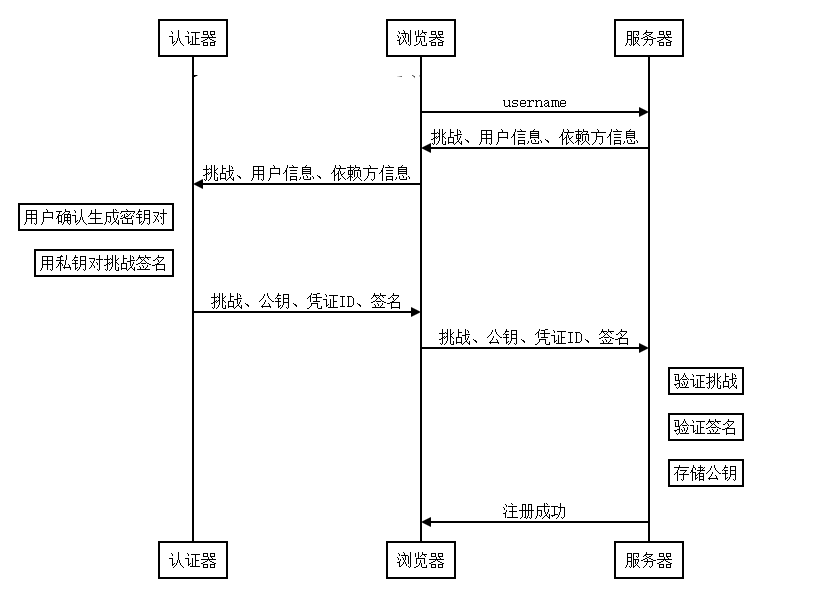
1、用户输入username(理解为账号,可以是手机号、邮箱等),前端发起注册请求,把username传到后端
2、后端拿到username后,先验证该username是否被注册;然后生成挑战;然后将username、挑战缓存起来(可以用session或redis);然后返回给前端挑战、用户信息、依赖方信息
(1)挑战:一个随机的ByteArray转成的base64字符串
(2)用户信息:包含id,name,displayName;id由后端随机生成(出于安全考量,这应尽可能不与任何用户信息相关联,如不要包含用户名、用户邮箱等),name即username,displayName为展示名,可以随便。(3)依赖方信息:包含后端指定的签名算法、认证方式、所在域名等信息
3、浏览器请求认证器,生成公钥私钥,请求认证器的具体方式如下:
navigator.credentials.create(credentialCreateOptions).then(publicKeyCredential => {
    console.log(publicKeyCredential)
})
其中,参数credentialCreateOptions比较复杂,他包含这些内容:
{
    publicKey: {
        challenge,        //挑战
        rp: {             //依赖方信息
            id,
            name
        },
        user: {           //用户信息
            id,
            name,
            displayName
        },
        pubKeyCredParams: [     //算法列表
            {
                type: "public-key",
                alg
            }
        ],
        authenticatorSelection: {    //指定的认证器类型(可选)
            authenticatorAttachment,
            userVerification
        },
        excludeCredentials: [       //用于标识要排除的凭证
            {
                id,
                transports: [],
                type: "public-key"
            }
        ],
        timeout                     //超时时间
    }
}
参数说明如下:
challenge: Uint8Array:转换为Uint8Array的挑战,长度至少为 16,建议为 32rp: Object:依赖方信息,其中有一项为必须:rp.id: String:(可选)依赖方 ID,必须为当前域名或为当前域名的子集的域名(不是子域名)。如域名为test.123.example.com,则依赖方 ID 可以是test.123.example.com,123.example.com或example.com。不指定则默认使用当前域名rp.name: String:依赖方名称,用于方便用户辨认
user: Object:用户信息,其中有三项为必须:user.id: Uint8Array:转换为Uint8Array的字符串。出于安全考量,这应尽可能不与任何用户信息相关联,如不要包含用户名、用户邮箱等user.name: String:登录用户名user.dispalyName: String:用于显示的用户名称,显示与否的具体行为取决于浏览器
pubKeyCredParams: Array:一个算法列表,指明依赖方接受哪些签名算法。列表的每一项都是一个对象,拥有两个属性:pubKeyCredParams[].type: String:值只能为 "public-key"pubKeyCredParams[].alg: Number:一个负整数,用于标明算法。具体算法对应的数字可以在 COSE 找到
authenticatorSelection: Object:(可选)用于过滤正确的认证器,这里介绍常用的一个参数:authenticatorSelection.authenticatorAttachment: String:(可选)指定要求的认证器类型。如果没有满足要求的认证器,认证可能会失败。该参数可以为null(表示接受所有类型的认证器)或是以下两个值之一:platform:表示仅接受平台内置的、无法移除的认证器,如手机的指纹识别设备cross-platform:表示仅接受外部认证器,如 USB Key
authenticatorSelection.userVerification: String:(可选)指定认证器是否需要验证“用户为本人 (User Verified, UV)”,否则只须“用户在场 (User Present, UP)”。具体验证过程取决于认证器(不同认证器的认证方法不同,也有认证器不支持用户验证),而对验证结果的处理情况则取决于依赖方。该参数可以为以下三个值之一:required:依赖方要求用户验证preferred:(默认)依赖方希望有用户验证,但也接受用户在场的结果discouraged:依赖方不关心用户验证。对于 iOS/iPad OS 13,必须设置为此值,否则验证将失败
excludeCredentials: Array:(可选)用于标识要排除的凭证,可以避免同一个用户多次注册同一个认证器。如果用户试图注册相同的认证器,用户代理会抛出InvalidStateError错误。数组中的每一项都是一个公钥凭证对象,包含以下属性:excludeCredentials[].type: String:值只能为 "public-key"excludeCredentials[].id: Uint8Array:要排除的凭证 IDexcludeCredentials[].transports: Array:(可选)用于指定该凭证所需的认证器与用户代理的通信方式,可以包含以下的一或多个字符串:usb:可以通过 USB 连接的认证器nfc:可以通过 NFC 连接的认证器ble:可以通过蓝牙连接的认证器internal:平台内置的、无法移除的认证器
timeout: Number:(可选)方法超时时间的毫秒数,超时后将强制终止create()并抛出错误。若不设置,将使用用户代理的默认值;若太大或太小,则使用最接近的用户代理默认值范围中的值。推荐值为 5000-120000
返回值PublicKeyCredential 包含以下字段:
{
    rawId: ArrayBuffer(32) {},
    response: AuthenticatorAttestationResponse {
        attestationObject: ArrayBuffer(390) {},
        clientDataJSON: ArrayBuffer(121) {}
    },
    id: "VByF2w2hDXkVsevQFZdbOJdyCTGOrI1-sVEzOzsNnY0",
    type: "public-key"
}
id: String:Base64URL 编码的凭证 IDrawId: ArrayBuffer:ArrayBuffer的原始凭证 IDtype: String:一定是 "public-key"response: Object:AuthenticatorAttestationResponse对象,是PublicKeyCredential的主要部分,包含以下两个内容:response.clientDataJSON: ArrayBuffer:客户端数据,包含 origin(即凭证请求来源)、挑战等信息response.attestationObject: ArrayBuffer:CBOR 编码的认证器数据,包含凭证公钥、凭证 ID、签名(如果有)、签名计数等信息
4、用户授权生成密钥对,通过PIN、指纹、面部识别等方式
5、前端讲上一步认证器返回的结果传到后端,进行注册验证
6、后端首先校验前端传过来的挑战是否和自己缓存中的一致;然后利用公钥解密签名,解密后的签名应该和挑战一致;最后保存公钥和认证信息,整个注册流程完成。
登录流程
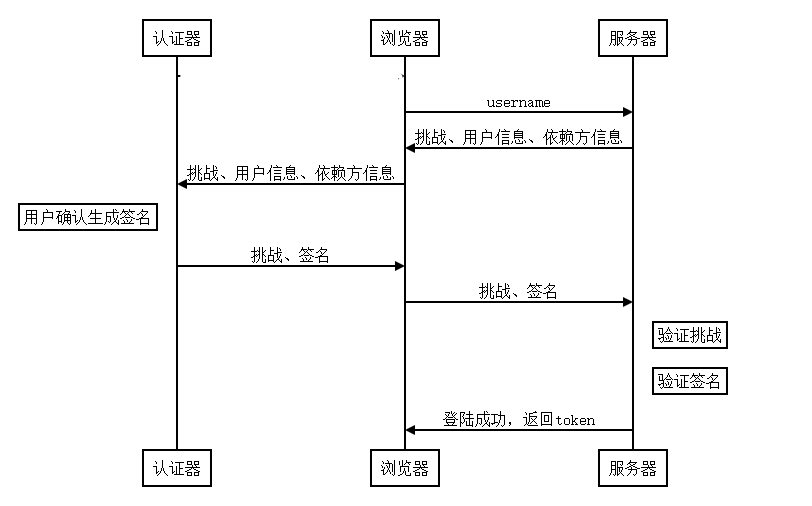
1、浏览器向服务器发送登陆请求,携带username
2、服务器向浏览器发送挑战,并缓存挑战
3、浏览器向认证器发送挑战、依赖方信息和客户端信息,请求对挑战签名
4、认证器请求用户授权动作,随后通过依赖方信息找到对应私钥,并使用私钥签名挑战(即断言),交给浏览器
5、浏览器将签名后的挑战发送给服务器
6、服务器用之前存储的公钥验证挑战是否与发送的一致,一致则验证成功,返回token
其中第三步,浏览器向认证器请求签名的实现方式如下:
navigator.credentials.get(credentialGetOptions).then(publicKeyCredential =>{
    console.log(publicKeyCredential);
})
参数credentialGetOptions包含以下字段:
{
    publicKey: {
        challenge,
        rpId,
        userVerification,
        allowCredentials: [
            {
                id,
                transports: [],
                type: "public-key"
            }
        ],
        timeout
    }
}
challenge: Uint8Array:转换为Uint8Array的挑战,长度至少为 16,建议为 32rpID: String:(可选)依赖方 ID,需要和注册认证器时的一致。规则和上述的rp.id一致,不指定默认使用当前域名userVerification: String:和上文一样,只是需要注意它这次不在authenticatorSelection中了allowCredentials: Array:(可选)用于标识允许的凭证 ID,使用户代理找到正确的认证器。只有符合这个列表中凭证 ID 的凭证才能被成功返回。数组中的每一项都是对象,包含以下属性:allowCredentials[].type: String:值只能为 "public-key"allowCredentials[].id: Uint8Array:允许的凭证 IDallowCredentials[].transports: Array:(可选)用于指定该凭证所需的认证器与用户代理的通信方式,可以包含以下的一或多个字符串:usb:可以通过 USB 连接的认证器nfc:可以通过 NFC 连接的认证器ble:可以通过蓝牙连接的认证器internal:平台内置的、无法移除的认证器
timeout: Number:(可选)方法超时时间的毫秒数,和上面的一样,推荐值为 5000-120000
返回值publicKeyCredential包含以下字段:
{
    rawId: ArrayBuffer(32) {},
    response: AuthenticatorAssertionResponse {
        authenticatorData: ArrayBuffer(37) {},
        signature: ArrayBuffer(256) {},
        userHandle: ArrayBuffer(64) {},
        clientDataJSON: ArrayBuffer(118) {}
    }
    id: "VByF2w2hDXkVsevQFZdbOJdyCTGOrI1-sVEzOzsNnY0"
    type: "public-key"
}
id: String:Base64URL 编码的凭证 IDrawId: ArrayBuffer:ArrayBuffer的原始凭证 IDtype: String:一定是 "public-key"response: Object:对于验证流程,认证会返回AuthenticatorAssertionResponse而不是AuthenticatorAttestationResponse对象,这个对象包含以下 4 个属性:response.authenticatorData: ArrayBuffer:认证器信息,包含认证状态、签名计数等response.signature: ArrayBuffer:被认证器签名的authenticatorData+clientDataHash(clientDataJSON的 SHA-256 hash)response.userHandle: ArrayBuffer:create()创建凭证时的用户 IDuser.id。许多 U2F 设备不支持这一特性,这一项将会是nullresponse.clientDataJSON: ArrayBuffer:客户端数据,包含 origin(即凭证请求来源)、挑战等信息
演示视频
windows端:
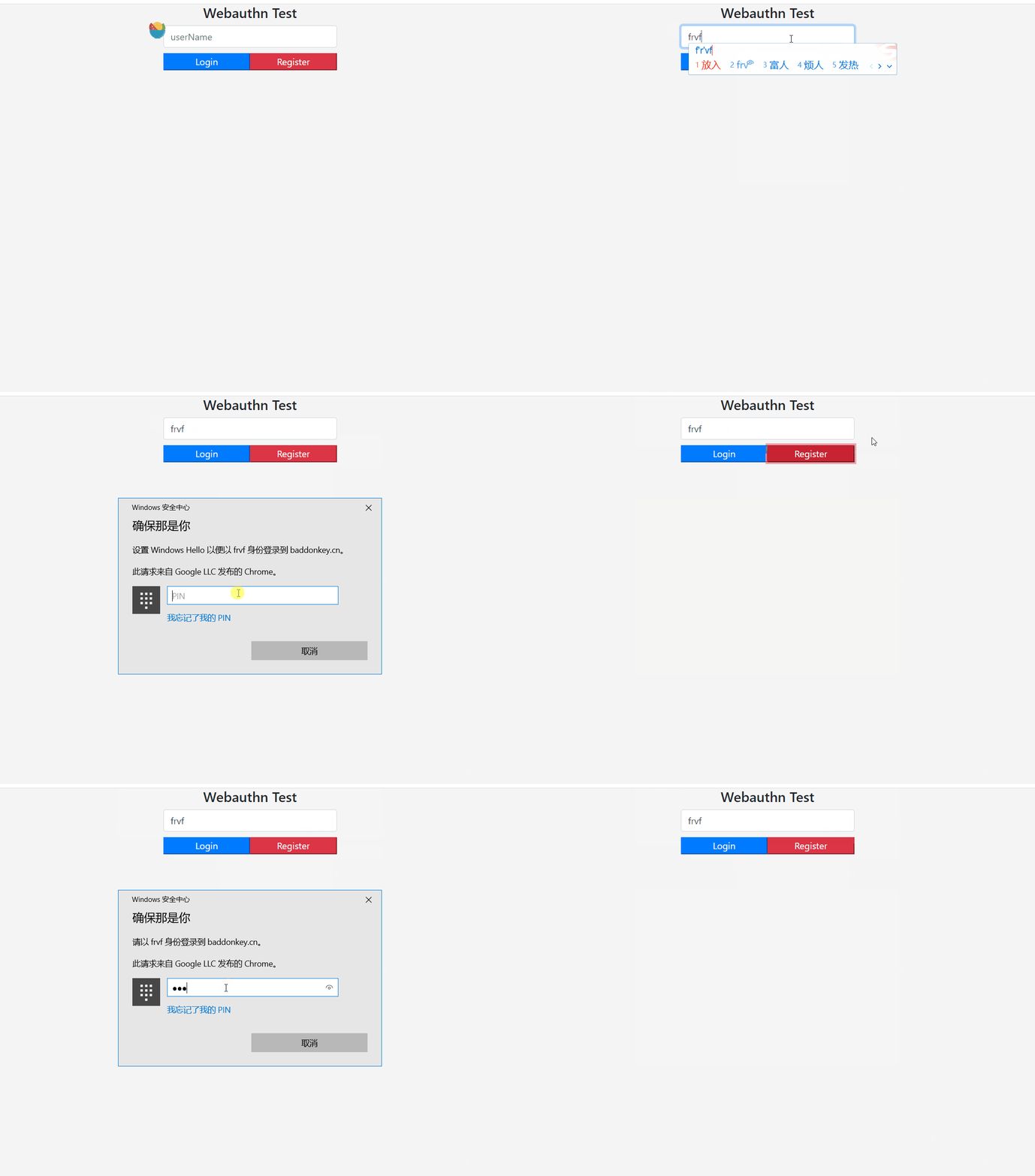
安卓手机chrome浏览器(黑屏是因为输入指纹的时候,系统不允许录制,被禁了):
苹果手机:
mac演示:
苹果扫码登录mac端(这个功能我没能在安卓上测试成功):
关于webauthn的几个缺点
1、多设备登录问题
由于私钥存储在设备中,换设备登录会比较麻烦,有两种办法:
(1)支持多设备绑定,即一个用户可以对应多个公钥,这需要通过业务开发才能支持
(2)设备与设备之间打通,就是说,当前账号是在我手机上注册的,如果我想在电脑上登录,那么电脑和手机互联,电脑把相关数据变成二维码,手机扫码完成签名发送到电脑,从而完成认证。上面视频中扫码演示的,便是这个功能,但是只在mac与ios中测试成功了,在windows与安卓的组合中并未成功,具体原因不清楚。
2、文档不全,生态不够好
国内关于webauthn的中文文档十分少;webauthn方法的相关框架也不多,使用webauthn技术的网站也不多(压根没见到),生态不够好。
3、不能作为唯一的认证方式
webauthn仅限于浏览器中使用,且考虑到设备更换、设备丢失等,可能还是需要额外绑定手机、邮箱等作为账号找回的手段。也可以把webauthn作为二次认证的方式。
4、必须在https的环境中使用
如果你在调试的时候,浏览器控制台报这个错误:
Cannot read properties of undefined (reading 'create')
at http://192.168.1 .209 :9093/webauthntest :59
at ......
....
那很有可能是因为你的测试环境不是在127.0.0.1或者https域名下,假如不是在这两种环境下,浏览器会认为当前环境不安全,navigator.credentials将返回undefined
哪些浏览器支持webauthn?
Google Chrome 67 或更高版本
Microsoft Edge 85 或更高版本
Safari 14 或更高版本
参考文章
https://flyhigher.top/develop/2160.html
附录:整套流程代码实现
前端:jquery
后端:springboot
前端先画个username输入框,一个登录按钮,一个注册按钮代码:
<div style="margin: 0 auto;width: 300px;text-align: center" >
    <h4 style="display: block">Webauthn Test</h4>
    <input type="text" id="username" placeholder="userName" class="form-control"/>
    <div style="display: flex;justify-content: space-between;margin-top: 10px;">
        <button class="btn-primary" id="btn-log" style="flex: 1">Login</button>
        <button class="btn-danger" id="btn-reg" style="flex: 1">Register</button>
    </div>
</div>

<script type="module">
    //webauthn.js是对后端api接口的封装,不具体展示了
    import {register, registerauth, login, finishLogin} from '../static/js/webauthn.js'

       //为注册按钮绑定时间
    $('#btn-reg').click(function () {
        let val = $('#username').val();
        if (!val) {
            return;
        }
        register({userName: val, displayName: val}, res => {
            if (res.success) {
                let credentialCreateJson = JSON.parse(res.result)
                let credentialCreateOptions = {
                    publicKey: {
                        ...credentialCreateJson.publicKey,
                        challenge: base64urlToUint8array(credentialCreateJson.publicKey.challenge),
                        user: {
                            ...credentialCreateJson.publicKey.user,
                            id: base64urlToUint8array(credentialCreateJson.publicKey.user.id),
                        },
                        excludeCredentials: credentialCreateJson.publicKey.excludeCredentials.map(credential => ({
                            ...credential,
                            id: base64urlToUint8array(credential.id),
                        })),
                        extensions: credentialCreateJson.publicKey.extensions,
                    }
                }
                console.log('credentialCreateOptions:')
                console.log(credentialCreateOptions)
                navigator.credentials.create(credentialCreateOptions).then(publicKeyCredential => {
                    console.log('publicKeyCredential')
                    console.log(publicKeyCredential)
                    return {
                        type: publicKeyCredential.type,
                        id: publicKeyCredential.id,
                        response: {
                            attestationObject: uint8arrayToBase64url(publicKeyCredential.response.attestationObject),
                            clientDataJSON: uint8arrayToBase64url(publicKeyCredential.response.clientDataJSON),
                            transports: publicKeyCredential.response.getTransports && publicKeyCredential.response.getTransports() || [],
                        },
                        clientExtensionResults: publicKeyCredential.getClientExtensionResults(),
                    }
                }).then(encodedResult => {
                    // const form = document.getElementById("form");
                    // const formData = new FormData(form);
                    console.log('encodedResult')
                    console.log(encodedResult)
                    // formData.append("credential", JSON.stringify(encodedResult));
                    let param = {username: val, credential: JSON.stringify(encodedResult)};
                    registerauth(param, function (res) {
                        console.log(res)
                        if (res.success) {
                            alert('注册成功')
                        } else {
                            alert(res.errorDesc)
                        }
                    })
                })
            }
        })

    });

    //为登录按钮绑定事件
    $('#btn-log').click(function () {
        let val = $('#username').val();
        if (!val) {
            return;
        }
        login({username: val}, function (res) {
            if (!res.success) {
                alert(res.errorDesc)
            }
            let credentialGetJson = JSON.parse(res.result);
            let credentialGetOptions = {
                publicKey: {
                    ...credentialGetJson.publicKey,
                    allowCredentials: credentialGetJson.publicKey.allowCredentials
                        && credentialGetJson.publicKey.allowCredentials.map(credential => ({
                            ...credential,
                            id: base64urlToUint8array(credential.id),
                        })),
                    challenge: base64urlToUint8array(credentialGetJson.publicKey.challenge),
                    extensions: credentialGetJson.publicKey.extensions,
                },
            };
            console.log(credentialGetOptions);
            navigator.credentials.get(credentialGetOptions).then(publicKeyCredential =>{
                let encodedResult = {
                    type: publicKeyCredential.type,
                    id: publicKeyCredential.id,
                    response: {
                        authenticatorData: uint8arrayToBase64url(publicKeyCredential.response.authenticatorData),
                        clientDataJSON: uint8arrayToBase64url(publicKeyCredential.response.clientDataJSON),
                        signature: uint8arrayToBase64url(publicKeyCredential.response.signature),
                        userHandle: publicKeyCredential.response.userHandle && uint8arrayToBase64url(publicKeyCredential.response.userHandle),
                    },
                    clientExtensionResults: publicKeyCredential.getClientExtensionResults(),
                }
                console.log(encodedResult);
                return encodedResult;
            }).then(encodedResult => {
                let params = {
                    username: val,
                    credential: JSON.stringify(encodedResult)
                }
                finishLogin(params, function (res) {
                    if (res.success) {
                        alert('登陆成功')
                    } else {
                        alert(res.errorDesc)
                    }
                })
            })
        })
    })
</script>


<script>
    function base64urlToUint8array(base64Bytes) {
        const padding = '===='.substring(0, (4 - (base64Bytes.length % 4)) % 4);
        return base64js.toByteArray((base64Bytes + padding).replace(/\//g, "_").replace(/\+/g, "-"));
    }
    function uint8arrayToBase64url(bytes) {
        if (bytes instanceof Uint8Array) {
            return base64js.fromByteArray(bytes).replace(/\+/g, "-").replace(/\//g, "_").replace(/=/g, "");
        } else {
            return uint8arrayToBase64url(new Uint8Array(bytes));
        }
    }
    class WebAuthServerError extends Error {
        constructor(foo = 'bar', ...params) {
            super(...params)
            this.name = 'ServerError'
            this.foo = foo
            this.date = new Date()
        }
    }
    function throwError(response) {
        throw new WebAuthServerError("Error from client", response.body);
    }
    function checkStatus(response) {
        if (response.status !== 200) {
            throwError(response);
        } else {
            return response;
        }
    }
    function initialCheckStatus(response) {
        checkStatus(response);
        return response.json();
    }
    function followRedirect(response) {
        if (response.status == 200) {
            window.location.href = response.url;
        } else {
            throwError(response);
        }
    }
    function displayError(error) {
        const errorElem = document.getElementById('errors');
        errorElem.innerHTML = error;
        console.error(error);
    }

</script>
后端:
使用框架实现,先引入依赖:
<dependency>
    <groupId>com.yubico</groupId>
    <artifactId>webauthn-server-core</artifactId>
    <version>1.12.1</version>
    <scope>compile</scope>
</dependency>
需要重写CredentialRepository
package com.zjh.znwz.service;

import java.util.List;
import java.util.Optional;
import java.util.Set;
import java.util.stream.Collectors;

import com.yubico.webauthn.CredentialRepository;
import com.yubico.webauthn.RegisteredCredential;
import com.yubico.webauthn.data.ByteArray;
import com.yubico.webauthn.data.PublicKeyCredentialDescriptor;

import com.zjh.common.entity.WebauthUser;
import com.zjh.znwz.dao.WebauthUserMapper;
import org.springframework.beans.factory.annotation.Autowired;
import org.springframework.stereotype.Repository;

import lombok.Getter;

@Repository
@Getter
public class RegistrationService implements CredentialRepository {

    @Autowired
    private WebauthUserMapper webauthUserMapper;

    @Override
    public Set<PublicKeyCredentialDescriptor> getCredentialIdsForUsername(String username) {

        List<WebauthUser> webauthUsers = webauthUserMapper.selectByUsername(username);
        return webauthUsers.stream()
                .map(
                        webauthUser ->
                                PublicKeyCredentialDescriptor.builder()
                                        .id(ByteArray.fromBase64(webauthUser.getCredentialId()))
                                        .build())
                .collect(Collectors.toSet());
    }

    @Override
    public Optional<ByteArray> getUserHandleForUsername(String username) {
        List<WebauthUser> webauthUsers = webauthUserMapper.selectByUsername(username);
        return Optional.of(ByteArray.fromBase64(webauthUsers.get(0).getHandle()));
    }

    @Override
    public Optional<String> getUsernameForUserHandle(ByteArray userHandle) {
        List<WebauthUser> webauthUsers = webauthUserMapper.selectByHandle(userHandle.getBase64());
        return Optional.of(webauthUsers.get(0).getUsername());
    }

    @Override
    public Optional<RegisteredCredential> lookup(ByteArray credentialId, ByteArray userHandle) {
        WebauthUser webauthUsers = webauthUserMapper.selectOneByCredentialIdAndHandle(credentialId.getBase64(), userHandle.getBase64());
        Optional<WebauthUser> auth = Optional.of(webauthUsers);
        return auth.map(
                credential ->
                        RegisteredCredential.builder()
                                .credentialId(ByteArray.fromBase64(credential.getCredentialId()))
                                .userHandle(ByteArray.fromBase64(credential.getHandle()))
                                .publicKeyCose(ByteArray.fromBase64(credential.getPublicKey()))
//                                .signatureCount(credential.getCount())
                                .build()
        );
    }

    @Override
    public Set<RegisteredCredential> lookupAll(ByteArray credentialId) {
        List<WebauthUser> auth = webauthUserMapper.selectByCredentialId(new String(credentialId.getBytes()));
        return auth.stream()
                .map(
                        credential ->
                                RegisteredCredential.builder()
                                        .credentialId(ByteArray.fromBase64(credential.getCredentialId()))
                                        .userHandle(ByteArray.fromBase64(credential.getHandle()))
                                        .publicKeyCose(ByteArray.fromBase64(credential.getPublicKey()))
//                                        .signatureCount(credential.getCount())
                                        .build())
                .collect(Collectors.toSet());
    }
}
初始化RelyingParty,放入容器中
package com.zjh.znwz.config;

import com.yubico.webauthn.RelyingParty;
import com.yubico.webauthn.data.RelyingPartyIdentity;
import com.zjh.znwz.service.RegistrationService;
import org.springframework.beans.factory.annotation.Value;
import org.springframework.context.annotation.Bean;
import org.springframework.context.annotation.Configuration;

import java.util.HashSet;

/**
 * @author 1
 * @date 2023-02-01 11:32
 **/
@Configuration
public class RelyingPartyConfig {

    //@Value("${webauthn.host}")
    private String host = "http://localhost:9093";

   // @Value("${webauthn.id}")
    private String webauthnId = "localhost";

    @Bean
    public RelyingParty relyingParty(RegistrationService regisrationRepository) {
        RelyingPartyIdentity rpIdentity = RelyingPartyIdentity.builder()
                .id(webauthnId)
                .name("webauthntest")
                .build();
        HashSet<String> set = new HashSet<>();
        set.add(host);
        return RelyingParty.builder()
                .identity(rpIdentity)
                .credentialRepository(regisrationRepository)
                .origins(set)
                .build();

    }
}
controller代码:
package com.zjh.znwz.controller;

import com.alibaba.fastjson.JSON;
import com.fasterxml.jackson.core.JsonProcessingException;
import com.yubico.webauthn.*;
import com.yubico.webauthn.data.*;
import com.yubico.webauthn.exception.AssertionFailedException;
import com.yubico.webauthn.exception.RegistrationFailedException;
import com.zjh.common.entity.WebauthUser;
import com.zjh.common.page.Result;
import com.zjh.znwz.dao.WebauthUserMapper;
import com.zjh.znwz.utils.RedisUtil;
import org.apache.commons.lang3.StringUtils;
import org.springframework.http.HttpStatus;
import org.springframework.stereotype.Controller;
import org.springframework.util.CollectionUtils;
import org.springframework.web.bind.annotation.PostMapping;
import org.springframework.web.bind.annotation.RequestBody;
import org.springframework.web.bind.annotation.RequestMapping;
import org.springframework.web.bind.annotation.ResponseBody;
import org.springframework.web.server.ResponseStatusException;

import javax.servlet.http.HttpSession;
import java.io.IOException;
import java.security.SecureRandom;
import java.util.List;
import java.util.Map;

/**
 * @author 1
 * @date 2023-01-31 14:56
 **/
@Controller
@RequestMapping("/webauthn")
public class TestWebauthnController {


    private final WebauthUserMapper webauthUserMapper;

    private final RelyingParty relyingParty;

    private final RedisUtil redisUtil;

    public TestWebauthnController(WebauthUserMapper webauthUserMapper, RelyingParty relyingParty, RedisUtil redisUtil) {
        this.webauthUserMapper = webauthUserMapper;
        this.relyingParty = relyingParty;
        this.redisUtil = redisUtil;
    }

    @PostMapping("/register")
    @ResponseBody
    public Result register(@RequestBody Map<String, String> map, HttpSession session) throws JsonProcessingException {

        String userName = map.get("userName");
        String displayName = map.get("displayName");
        if (StringUtils.isEmpty(userName) || StringUtils.isEmpty(displayName)) {
            throw new RuntimeException();
        }
        //验证userName是否已被注册
        List<WebauthUser> webauthUsers = webauthUserMapper.selectByUsername(userName);
        if (!CollectionUtils.isEmpty(webauthUsers)) {
            throw new RuntimeException("userName已被注册");
        }

        byte[] bytes = new byte[32];
        new SecureRandom().nextBytes(bytes);
        UserIdentity userIdentity = UserIdentity.builder()
                .name(userName)
                .displayName(displayName)
                .id(new ByteArray(bytes))
                .build();
        System.out.println(userIdentity.getId().getBase64());
        StartRegistrationOptions registrationOptions = StartRegistrationOptions.builder()
                .user(userIdentity)
                .build();
        PublicKeyCredentialCreationOptions registration = relyingParty.startRegistration(registrationOptions);
        redisUtil.set("register-" + userName, registration.toJson(), 300);
        try {
            String s = registration.toCredentialsCreateJson();
            System.out.println(s);
            return Result.success(s);
        } catch (JsonProcessingException e) {
            throw new ResponseStatusException(HttpStatus.INTERNAL_SERVER_ERROR, "Error processing JSON.", e);
        }
    }

    @PostMapping("/registerauth")
    @ResponseBody
    public Result registerauth(@RequestBody Map<String, String> map, HttpSession session) {
        String username = map.get("username");
        String credential = map.get("credential");
        try {
            Object o = redisUtil.get("register-" + username);
            if (o == null) {
                throw new ResponseStatusException(HttpStatus.INTERNAL_SERVER_ERROR, "Cached request expired. Try to register again!");
            }
            PublicKeyCredentialCreationOptions requestOptions = PublicKeyCredentialCreationOptions.fromJson(o.toString());
            if (requestOptions != null) {
                PublicKeyCredential<AuthenticatorAttestationResponse, ClientRegistrationExtensionOutputs> pkc =
                        PublicKeyCredential.parseRegistrationResponseJson(credential);
                FinishRegistrationOptions options = FinishRegistrationOptions.builder()
                        .request(requestOptions)
                        .response(pkc)
                        .build();
                RegistrationResult result = relyingParty.finishRegistration(options);
                String credentialId = result.getKeyId().getId().getBase64();
                String publicKey = result.getPublicKeyCose().getBase64();
                WebauthUser webauthUser = new WebauthUser();
                webauthUser.setCredentialId(credentialId);
                webauthUser.setDisplayName(username);
                webauthUser.setPublicKey(publicKey);
                webauthUser.setHandle(requestOptions.getUser().getId().getBase64());
                webauthUser.setUsername(username);
                System.out.println(JSON.toJSONString(webauthUser));
                webauthUserMapper.insert(webauthUser);

                return Result.success();
            } else {
                throw new ResponseStatusException(HttpStatus.INTERNAL_SERVER_ERROR, "Cached request expired. Try to register again!");
            }
        } catch (RegistrationFailedException e) {
            throw new ResponseStatusException(HttpStatus.BAD_GATEWAY, "Registration failed.", e);
        } catch (IOException e) {
            throw new ResponseStatusException(HttpStatus.BAD_REQUEST, "Failed to save credenital, please try again!", e);
        }

    }

    @PostMapping("/login")
    @ResponseBody
    public Result login(@RequestBody Map<String, String> map, HttpSession session) {
        String username = map.get("username");
        List<WebauthUser> webauthUsers = webauthUserMapper.selectByUsername(username);
        if (CollectionUtils.isEmpty(webauthUsers)) {
            throw new RuntimeException("用户名不存在");
        }
        AssertionRequest request = relyingParty.startAssertion(StartAssertionOptions.builder()
                .username(username)
                .build());
        try {
            redisUtil.set("login-" + username, request.toJson());
            return Result.success(request.toCredentialsGetJson());
        } catch (JsonProcessingException e) {
            throw new ResponseStatusException(HttpStatus.BAD_REQUEST, e.getMessage());
        }
    }

    @PostMapping("/finishLogin")
    @ResponseBody
    public Result finishLogin(@RequestBody Map<String, String> map, HttpSession session) {

        String username = map.get("username");
        String credential = map.get("credential");

        try {
            PublicKeyCredential<AuthenticatorAssertionResponse, ClientAssertionExtensionOutputs> pkc;
            pkc = PublicKeyCredential.parseAssertionResponseJson(credential);
            Object o = redisUtil.get("login-" + username);
            AssertionRequest request = AssertionRequest.fromJson(o.toString());
            AssertionResult result = relyingParty.finishAssertion(FinishAssertionOptions.builder()
                    .request(request)
                    .response(pkc)
                    .build());
            if (result.isSuccess()) {
                return Result.success();
            } else {
                return Result.fail("登陆失败");
            }
        } catch (IOException e) {
            throw new RuntimeException("Authentication failed", e);
        } catch (AssertionFailedException e) {
            throw new RuntimeException("Authentication failed", e);
        }
    }

} 







高谈阔论